
DotFetch v1.2.0 — A deep dive into building a professional REST client inside VS Code with Auth, Retry Logic, JSON Highlighting, and a modular ES Modules architecture.”
tags: vscode, typescript, javascript, webdev
cover_image: https://raw.githubusercontent.com/kareem2099/DotFetch/main/media/screenshot-main.png
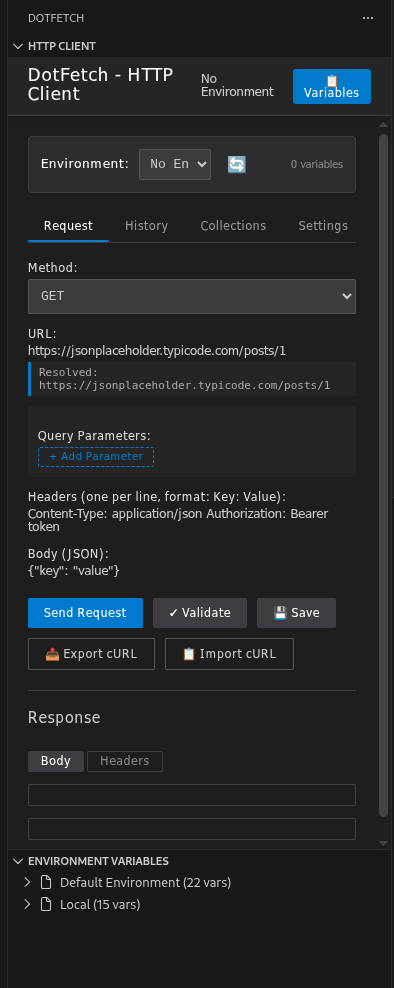
I’ve been building DotFetch — a VS Code extension that replaces Postman/Insomnia for developers who live inside their editor. Version 1.2.0 just dropped, and I want to share the interesting engineering decisions behind it.
What is DotFetch?
An HTTP client that lives inside your VS Code sidebar. No context switching, no separate app. Just open the panel and fire requests.
Features shipped in v1.2.0:
✅ Basic Auth (RFC 7617) + Bearer Token (RFC 6750)
✅ JSON Syntax Highlighting
✅ Request Templates
✅ Auto Retry with Linear Backoff
✅ History Search & Filter
✅ Collection Export to JSON
✅ Modular ES Modules architecture
🎥 See it in action (60-second Demo)
Problem 1: VS Code Webviews are sandboxed
The biggest surprise when building a VS Code extension with a Webview: you can’t use window.prompt(), window.alert(), or window.confirm() reliably. They’re blocked in the webview sandbox.
I learned this the hard way when building the Template save feature:
// ❌ This silently does nothing in VS Code webviews
const name = window.prompt('Template name:', defaultName);
The fix? Build a proper modal and communicate via postMessage:
// ✅ Show a real modal instead
function saveAsTemplate() {
    const modal = document.getElementById('template-modal');
    const nameInput = document.getElementById('template-name');

    if (modal) { modal.classList.add('modal-visible'); }
    if (nameInput) {
        nameInput.value = defaultName;
        nameInput.focus();
        nameInput.select();
    }
}

function confirmSaveAsTemplate() {
    const name = document.getElementById('template-name').value.trim();
    if (!name) {
        vscode.postMessage({ type: 'notify', level: 'error', text: 'Enter a name' });
        return;
    }
    // ... save logic
}
Rule of thumb: Never use browser dialogs in a VS Code webview. Always build custom modals.
Problem 2: The 2000-line script.js monster
After shipping 5 features, media/script.js hit 2000+ lines and was growing fast. I decided to refactor before adding more features — best decision I made.
The Architecture
src/webview/
├── state.js         ← Single shared state object
├── api.js           ← vscode.postMessage wrapper
├── ui.js            ← Tabs, modals, previews, query params
├── auth.js          ← T201, T202
├── highlighting.js  ← T203 JSON highlighting
├── collections.js   ← Collections + Templates (T204)
├── history.js       ← History management
├── curl.js          ← cURL import/export
├── request.js       ← sendRequest, loadForm, save
└── main.js          ← Entry point + message handler
The Shared State Pattern
Instead of scattering state across files, I centralized everything:
// src/webview/state.js
export const state = {
    queryParams: [],
    history: [],
    collections: {},
    expandedCollections: new Set(),
    currentRequest: null,
    settings: { timeout: 10000 },
    environments: [],
    isRequestInProgress: false,
    isUpdatingPreview: false,
    previewTimeout: null,
    authConfig: { type: 'none', username: '', password: '', token: '' }
};
Every module imports state and mutates it directly. Simple, predictable, no prop drilling.
The API Wrapper
// src/webview/api.js
let _vscode = null;

export function initApi(vscode) {
    _vscode = vscode;
}

export function post(message) {
    _vscode.postMessage(message);
}

export function notify(level, text) {
    _vscode.postMessage({ type: 'notify', level, text });
}
Now any module can call notify('error', 'Something went wrong') without knowing about VS Code internals.
esbuild bundles it all
The key insight: esbuild takes the ES Modules source and bundles it into a single media/script.js that VS Code can load.
// package.json
{
  "scripts": {
    "esbuild-base": "esbuild ./src/extension.ts --bundle --outfile=out/extension.js --external:vscode --format=cjs --platform=node && esbuild ./src/webview/main.js --bundle --outfile=media/script.js --format=iife --platform=browser"
  }
}
Result: media/script.js went from 2000 lines hand-written to 49.6 KB bundled — and each source file is clean and focused.
Problem 3: Implementing Auto Retry the Right Way
The retry logic lives in extension.ts (Node.js side), not the webview. Here’s the full retry loop:
private async handleRequest(webviewView: vscode.WebviewView, message: any) {
    const startTime = Date.now();
    const maxRetries = Math.min(Math.max(parseInt(message.retryCount) || 0, 0), 5);
    const retryableCodes = ['ECONNREFUSED', 'ENOTFOUND', 'ETIMEDOUT', 'ECONNABORTED'];

    let lastError: any = null;

    for (let attempt = 0; attempt <= maxRetries; attempt++) {
        // Notify UI about retry progress
        if (attempt > 0) {
            webviewView.webview.postMessage({
                type: 'retryAttempt',
                attempt,
                total: maxRetries
            });

            // Linear backoff: wait attempt * 1000ms
            await new Promise(resolve => setTimeout(resolve, attempt * 1000));
        }

        this.abortController = new AbortController();

        try {
            const response = await axios({ /* ... */ });

            // Success — send response and exit loop
            webviewView.webview.postMessage({
                type: 'response',
                // ...
                attempts: attempt + 1  // Let the UI know how many attempts it took
            });
            return;

        } catch (error: unknown) {
            lastError = error;

            // Don't retry if user cancelled
            if (error instanceof Error && error.name === 'CanceledError') {
                webviewView.webview.postMessage({
                    type: 'error',
                    error: 'Request cancelled',
                    cancelled: true
                });
                return;
            }

            // Only retry on network errors, not HTTP errors
            const isRetryable = axios.isAxiosError(error) &&
                error.request &&        // Request was made
                !error.response &&      // But no response received
                retryableCodes.includes((error as any).code || '');

            if (!isRetryable || attempt >= maxRetries) { break; }
        }
    }

    // All attempts failed — send descriptive error
    let errorMessage = buildErrorMessage(lastError, maxRetries);
    webviewView.webview.postMessage({ type: 'error', error: errorMessage });
}
Key decisions:
- Only retry on network-level errors (no response), not HTTP errors (4xx, 5xx). A
404should not be retried. - Linear backoff (
attempt * 1000ms) not exponential — simpler and sufficient for transient failures. - Max 5 retries, configurable per request.
- The UI shows
Retry 1/2...in the Send button during retries.
Problem 4: XSS-safe JSON Syntax Highlighting
I wanted pretty colored JSON without importing a library. The trick is to escape HTML first, then apply highlighting:
// src/webview/highlighting.js
export function syntaxHighlightJson(json) {
if (typeof json !== 'string') {
json = JSON.stringify(json, null, 2);
}
// CRITICAL: Escape HTML BEFORE adding spans
// Otherwise injected HTML in JSON values becomes XSS
json = json
.replace(/&/g, '&')
.replace(/</g, '<')
.replace(/>/g, '>');
return json.replace(
/("(\u[a-zA-Z0-9]{4}|\[^u]|[^\"])*"(s*:)?|b(true|false|null)b|-?d+(?:.d*)?(?:[eE][+-]?d+)?)/g,
(match) => {
let cls = 'json-number';
if (/^"/.test(match)) {
cls = /:$/.test(match) ? 'json-key' : 'json-string';
} else if (/true|false/.test(match)) {
cls = 'json-boolean';
} else if (/null/.test(match)) {
cls = 'json-null';
}
return `<span class="${cls}">${match}</span>`;
}
);
}
And the CSS (VS Code dark theme colors):
.json-key     { color: #9cdcfe; }  /* Light blue */
.json-string  { color: #ce9178; }  /* Orange */
.json-number  { color: #b5cea8; }  /* Light green */
.json-boolean { color: #569cd6; }  /* Blue */
.json-null    { color: #569cd6; }  /* Blue */
The colors match VS Code’s own JSON editor — intentional.
Problem 5: Auth without exposing credentials in logs
Basic Auth encoding happens in the browser (webview side), not in the extension. This prevents credentials from appearing in VS Code’s output channel:
// src/webview/auth.js
export function buildAuthHeader() {
    if (state.authConfig.type === 'basic' && state.authConfig.username) {
        // btoa() runs in the webview — never touches extension.ts logs
        const encoded = btoa(`${state.authConfig.username}:${state.authConfig.password}`);
        return `Authorization: Basic ${encoded}`;
    }
    if (state.authConfig.type === 'bearer' && state.authConfig.token) {
        return `Authorization: Bearer ${state.authConfig.token}`;
    }
    return null;
}
The auth header is injected into the headers string before sending to extension.ts:
// src/webview/request.js
const authHeader = buildAuthHeader();
if (authHeader) {
    const hasAuthHeader = finalHeaders.toLowerCase().includes('authorization:');
    if (!hasAuthHeader) {
        finalHeaders = finalHeaders.trim()
            ? `${finalHeaders.trim()}n${authHeader}`
            : authHeader;
    }
}
By the time extension.ts sees the headers, they’re already encoded. The logger never sees the raw credentials.
The .vscodeignore trick that matters
Before shipping, make sure your .vscodeignore excludes node_modules:
node_modules/**
src/**
**/*.map
**/*.ts
out/test/**
out/logger.js
out/environmentTree.js
out/environmentManager.js
out/utils/**

!out/extension.js
!package.json
!README.md
!CHANGELOG.md
!LICENSE
!media/**/*
With esbuild bundling node_modules into out/extension.js, you don’t need to ship node_modules at all. My package went from 250+ files to ~15 files.
What’s next for v1.3.0
- GraphQL support — dedicated query editor
- Response diffing — compare two responses side by side
- Import from Postman collections — migrate existing work
- WebSocket support — for real-time API testing
Try it out
VS Code / Cursor:
ext install FreeRave.dotfetch
VSCodium / Open VSX:
https://open-vsx.org/extension/freerave/dotfetch
Or build from source:
git clone https://github.com/kareem2099/DotFetch.git
cd DotFetch
npm install
npm run compile
# Press F5 in VS Code to launch Extension Development Host
If you find bugs or have feature requests, open an issue on GitHub. PRs are welcome! 🚀
Built with TypeScript, esbuild, and a lot of VS Code webview debugging.